
Finding the right Free AstroJS Hosting platform is important if you’re looking to launch a quick ASTROJS (ASTRO is a new static site generator) website that is Modern, and SEO-friendly, but don’t really want to pay server costs.
In 2026, there are many free AstroJS hosting options, from simple static site hosting services to more complex platforms with Git deployment, global CDN, custom domains, HTTPS, serverless functions, and SSR support. Whether you’re building a personal blog, portfolio, documentation, landing page, or small business website, we’ll help you compare the 10 best Free AstroJS hosting options for 2026 and identify the most suitable platform for your project.

What to Look for In Free AstroJS Hosting
Choosing a nifty hosting solution won’t only depend on that it’s free. An ideal infrastructure must attend to your technical requirements, SEO goals, performance, and long-term growth as well. Astro is predominantly used to develop static websites, blogs, portfolios, documentation websites, landing pages, and content-driven websites. This means that the best free Astro hosting must constitute a service with easy, fast, secure, and reliable deployment.
Prior to settling on a provider, check for a few essentials: static site hosting support, Git-based deployment, HTTPS, custom domains, CDN performance, build limits, bandwidth, Node.js version, SSR support, environment variables, redirects, and scalability.
Static site hosting support
First among the essentials is static site hosting support. Astro is unique for static websites in that it builds a true production-ready site at build time. When you run npm run build, Astro typically creates a dist folder with all the.html CSS, JavaScript, images, fonts, and other static assets required for publishing your site. Your free AstroJS hosting provider should let you set npm run build as the build command and dist as the output directory - the bare minimum basic technical settings for a static Astro site.
It should also support the common static files, such as .html,.css,.js, images, fonts, and other public assets. For most of your Astro blogs, personal sites, portfolios, landing pages, and documentation sites, static site hosting is sufficient.It’s easier, faster and easier to manage than a server-side application. If your website doesn’t need a user login, dynamic backend logic, or real-time data processing, static hosting will probably be the easiest free option going.
Git-Based Deployment
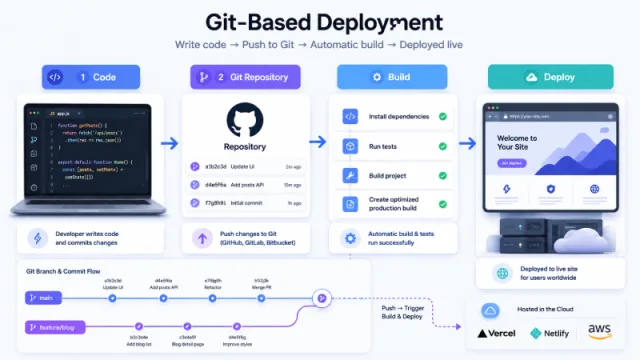
Git-based deployment is another facet to look for when picking your free AstroJS hosting. The best astrojs hosting will allow you to link your GitHub/GitLab/Bitbucket repo and automatically deploy your site whenever you push new code, so that you don’t have to remember to upload files every time you make a change to something on your site. An average Astro deployment workflow will look like this. Edit your website on your local machine, commit your changes, and push them to your Git repo, then your hosting will automatically run the command to build your website, and once that build process returns successfully, then your website is serving the latest version out on the Internet.
This workflow is useful if you maintain a frequently updated blog, landing pages, product pages, or documentation content. It’s worth doing your homework on each platform and seeing if they are supporting automatic deployment, preview deployment, branch deployment, build logs and rollback. Preview deployment will come in handy when you want to try out a change on staging before pushing it to your live site, and rollback support will come in handy if the new deployment breaks something and you need to revert to the previous working version.
Free HTTPS and Custom Domain Support
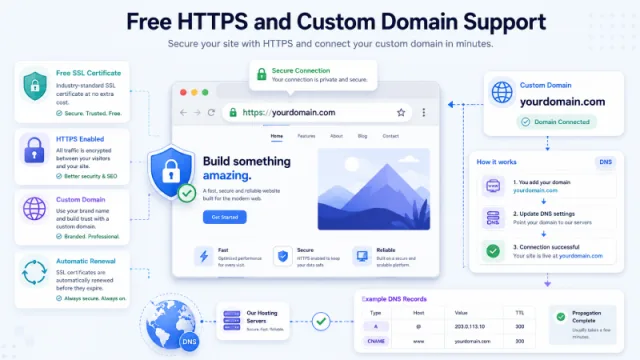
Free HTTPS support is expected for any modern website.HTTPS helps protect data between the visitor and your website, build browser trust, and is great for SEO. Most professional hosting platforms now provide free SSL certificates, but you should still check whether SSL is issued automatically and renewed without manual work.
Custom domain
Custom domain support is also very important if you want your Astro website to look professional, and not just have a default hosting URL. Instead of using a default URL like marketingblogaz.com, you should be able to connect your own domain like marketingblogaz.com, www.marketingblogaz.com, or blog.marketingblogaz.com. A custom domain is important for branding, user trust, and the long-term success of the site from an SEO perspective.
From a technical point of view, the astrojs hosting should support root domains, subdomains, and HTTP to HTTPS redirects. Check that you can enter standard DNS records like CNAME record, A record, or nameserver setup for a custom domain. If you are building a serious blog, business website, or SEO focused website, free HTTPS and custom domain support should be a must have.
Global CDN performance
Performance is one of the big reasons to use AstroJS, but hosting infrastructure still matters. Astro websites are usually lean and quick themselves, and a good hosting provider will speed them up even more by serving them through a global CDN. A CDN will store it and deliver your website files from a server located nearer to your visitors, helping load faster.
Check when you’re choosing free AstroJS hosting platform whether or not it includes global CDN delivery, particularly if you are targeting visitors from different countries and regions. Global CDNs can improve page speed, Core Web Vitals, and your site’s overall user experience and SEO performance.Other technical features to consider include static asset caching, cache control, Brotli or Gzip compression, support for HTTP/2, HTTP/3, and so on, which will allow your HTML, CSS, JavaScript, images, and fonts to load more quickly, and for content-focused Astro websites, good CDN performance can really make a difference both speed and experience-wise.
Build Minutes and Build Limits
Free hosting often comes with build limits and no matter how free the hosting service, it may restrict on a monthly basis build minutes, build timeout, frequency of deployments, number of projects, team members, concurrent builds, and more. These sort of limits are not something you’re going to run into on smaller Astro websites, but they will be important to you at some point.
A tiny Astro blog with a handful of pages is going to build quite rapidly; however, a massive content website, documentation site, or product catalog with thousands of pages is going to take longer. Running into a build timeout, or short fill up of monthly build minutes where you’re making big updates frequently, can cause you some headaches. How many build minutes do you get with the free plan? How long does each build have to run before hitting the time out? Is there build cache available? Being able to speed up deployments with previously retrieved dependencies and build data is worth knowing if you expect to be making updates to your Astro website regularly.
Bandwidth and Traffic Limits
Bandwidth is yet another technical factor that comes into play when selecting your obvious free choice of AstroJS hosting. Bandwidth is quite simply the amount of data transferred from your website to a visitor, as measured by the hosting platform.Your website comes with a bandwidth limit. Every time someone loads your website, they download HTML, CSS, JavaScript, images, fonts, and other assets. More visitors and media files mean more bandwidth used by your website.
A basic Astro blog with nicely optimized images will use very little bandwidth. An image-heavy website, product catalog, resource library, document management site, or anything similarly asset-intensive can burn through more bandwidth. If your website has large images; PDF files, videos, downloadable resources then you should read and digest your bandwidth limit very carefully.
You should also read through the request limits, storage limit, maximum file size, and the platform’s fair usage policy. Some free hosting providers are pretty generous; others try and limit you if you are running a popular website or a commercial project, etc. If you plan to use it for a while, choose a platform that gives your website enough room to grow.
Node.js Version and Build Environment
Astro requires a Node.js environment to build your website, even if the final output is a static site. Your hosting platform should still give you the ability to install dependencies and run the Astro build command. Hence there is Node.js version support technical detail.
A good free AstroJS hosting provider should support modern Node.js versions such as Node.js 18, Node.js 20 or newer. It should support common package managers such as npm, pnpm or yarn. At the basic level, it should allow you to configure the install command, build command, and output directory. For a typical Astro project, the install command will be: npm install, the build command is likely to be npm run build as in: s_cript build and output directory will typically be dist_.If the host provides clear support for these settings, it will almost always be capable of deploying a simple Astro website relatively easily.
SSR and Serverless Function Support
Many Astro websites are not entirely static. Projects may require server-side rendering, API routes for authentication, dynamic content, and store handling or backend logic. In such cases, check first whether the hosting platform supports SSR and serverless functions.
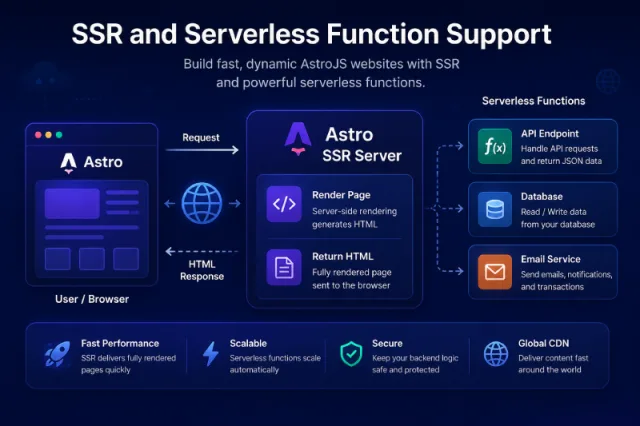
Astro supports different deployment adapters tailored to the hosting platform. The common adapters are @astrojs/vercel, @astrojs/netlify, @astrojs/cloudflare and @astrojs/node. If your project needs SSR, you want to check that the platform supports the right adapter and provides the required runtime environment.
Also check the technical limits for serverless function execution time, edge function support, API route support, cold start performance, and request limits. SSR won’t matter for most static blogs and marketing websites, but if your Astro project has dynamic functionality this becomes one of the most important hosting requirements.
Environment Variables Support
You may next need environment variables, particularly for external services your Astro project connects with. You probably need environment variables for things like your analytics IDs, CMS API tokens, site URLs, and also for form services, payment tools, and third party APIs.
A quality hosting platform should allow you to manage environment variables via its dashboard. Make sure it supports both public variables and private secret variables. Public variables, such as PUBLIC_SITE_URL or PUBLIC_GA_ID can potentially be exposed to the should be safe and not run client-side.
It’s a nice touch if different environment variables are available for production & preview deployments. This allows you to safely test changes on the duplicate before deploying to your live website. If you are using Astro with a headless CMS, analytics product or an external API this is an important feature.
Redirects & Routing Control
Redirect and routing control are extremely important when caring for your SEO. If you are migrating from WordPress to Astro, if you are changing your URL structure or reorganising content on your website, you may need to redirect old URLs or else users will see broken pages, and search engines may lose track of your content.
A good free AstroJS hosting platform will support 301 redirections, 302 redirections, rewrites, custom 404 pages, clean URLs and trailing slash control. 301 is used when a page has permanently moved and 302 is used for a temporary change. Rewrites can also help manage routing without changing the visible URL.
These features are really important for SEO focused websites. If you are pulling content over from another platform to Astro, proper redirects keep rankings, backlinks & user experience. For any serious blog or business website routing should not be something to overlook.Scalability and Upgrade Path Free hosting is a great starting point, but your website may grow over time. Free plan is likely sufficient for personal blog, small business website, portfolio or testing project when you’re starting out. However, if traffic increases, you may need more bandwidth, more build minutes, more storage, team collaboration or better support.
Before you select a free AstroJS hosting provider, check whether the platform does have a clear upgrade path. A good platform will let you smoothly upgrade from a free plan to a paid plan without rebuilding your entire deployment workflow from scratch. That’s good to know on the front end if you plan to turn your Astro project into serious content website, business website or commercial project.
Check commercial usage policy as well. Some free plans are indeed suitable for personal and hobby projects, others permit small commercial websites. Understanding this from the get-go will save you lots of headaches later!
Ease of Use for Beginners
Ease of use is another key consideration, especially if you’re new to AstroJS. Beginner-friendly hosting platform comes with simple dashboard, one-click Git import, automatic framework detection, readable build logs and clear documentation. These features make deployment easier and reduce the chance of technical errors.
Platforms like Cloudflare Pages, Vercel and Netlify are popular for this reason. They make it relatively simple to deploy frontend projects from Git repositories. Sometimes, all you need to do is connect your repository, set the build command to npm run build, set the output directory to dist, and deploy.
Good documentation and an active community is also helpful. If you run into build errors, domain setup or environment variable problems, clear documentation will save a lot of time. For beginners, the easiest platform is probably the one which helps you deploy quickly, while still giving you enough technical control as your project grows.
Final Technical Checklist
Are you sure you’ve selected AstroJS hosting platform that truly meets the basic technical requirements of your project? At minimum, hosts should support Astro build command npm run build, dist for output directory, modern Node.js version, Git-based deployment, free HTTPS, custom domains and global CDN delivery.
If your project is more advanced vaster check environment variables, preview deployments, rollback, redirects, serverless functions, SSR support, bandwidth limits, build minutes and scalability. Simple static Astro website probably won’t need for all advanced features, but it’s good to check on them upfront so you’re not left wandering in the technical weeds later!
In general, the best free AstroJS hosting provider should be easy to use, fast, secure, SEO friendly and flexible enough to support your website as it grows forwards!
10 Best Free AstroJS Hosting 2026
1/ Cloudflare Workers
If you want fast global delivery, edge deployment, and support for static assets as well as dynamic server-side features, Cloudflare Workers is one of the best free options for AstroJS! The official Cloudflare guide about Astro says; “Cloudflare Workers can be used to deploy Astro static assets, backend APIs, full-stack applications, and on-demand rendered pages.” For daily traffic on the Workers Free plan, Cloudflare gives you 100,000 requests.
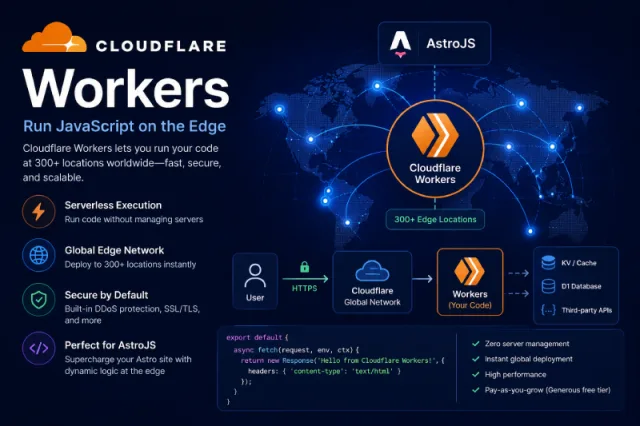
The free plan also includes 10 milliseconds of CPU time per invocation. For many small Astro websites, blogs, landing pages, and documentation sites, this can be enough, especially as most pages will be static and lightweight so you can save your allocation for the hit counter!
Workers Builds also has a generous free allowance. The free plan includes 3,000 build minutes per month, 1 concurrent build, 20-minute build timeout, 2 vCPU, 8GB memory, 20GB disk space, and up to 64 environment variables. These limits are useful if you deploy Astro from Git and want automatic builds.
For Astro you can use the common build setup: npm run build as the build command, and dist as output directory for static output. If your project requires SSR or edge rendering, you can use the Cloudflare adapter for Astro.
Free highlights: _100,000 requests/day, 3,000 build minutes/month, global Cloudflare network, CDN-style delivery, HTTPS, environment variables, static or on-demand Astro deployment.
Best for: Astro blogs, SEO websites, landing pages, documentation sites, advanced edge rendered Astro projects.
2/ Sevalla
Sevalla is another attractive free static hosting option for AstroJS. Sevalla’s official deployment guide for Astro gives explicit instructions stating that you can deploy your Astro site by simply connecting your GitHub, GitLab, or Bitbucket, and then setting the build command to: “npm run build”, and publishing to: “dist”. This low-friction approach makes this an easy option.
Worldwide site hosting is completely free for up to 100 static sites per account. Sevalla provides you with 600 free build minutes per month as standard, 100GB free bandwidth per month per account, and 1GB build size limit per site, and 1 concurrent build per site. Sevalla does also promote 260+ global edge locations, which promises fast delivery of static sites.
All this means that Sevalla is a great option for Astro static sites and particularly works well for blogs, portfolios, marketing pages, and documentation sites. Having 100GB of free bandwidth is very generous for many small and medium business content websites.
However, you should note that the free bandwidth is for each account/company and NOT a separate allotment for all sites hosted on that account. So if all your sites hosted on Sevalla exceed 100GB/month, the service will charge for extra usage.
Free highlights: 100 static sites, 600 build minutes/month, 100GB bandwidth/month/account, auto-deploy on Git push, 1GB size limit/site, 260+ edge locations.
Best for: free static Astro hosting, personal blogs, portfolios, business landing pages, and SEO content websites.
3/ Vercel
One of the easiest platforms to deploy your AstroJS projects, especially if you want a clean Git-based workflow. Hobby plan is free and targeted towards personal projects and small applications. Pricing page also lists free features for automatic CI/CD, global automated CDN, DDoS mitigation, traffic insights, and repository import.
Vercel Function maximum duration of 10 seconds by default, configurable to 60 seconds. The number of concurrent invocations of a Vercel Function cannot exceed 10. Cold starts can impact a Function’s ability to execute quickly upon invocation. 50,000 Web Analytics events. 10,000 Speed Insights data points.
Important: the Vercel Hobby plan is restricted to non-commercial, personal use under the fair use guidelines. If you’re building a business website, client website, or commercial anything, it’s worth additional scrutiny before choosing Vercel Hobby.
Free highlights: 100GB/month data transfer, 6,000 build minutes, 200 projects, 50 domains/project, 1M edge requests/month, 1M function invocations, automatic CI/CD, global CDN
Best for: personal Astro projects, portfolios, demos, frontend projects, preview deployments and small non-commercial websites.
4/ Render
Render supports free static site deployment and has official Astro deployment documentation. Render’s Astro guide informs us static Astro sites can be served over a global CDN, include fully managed TLS certificates, and support custom domains out of the box.
Render’s documentation states static sites are free to deploy, but that they do count against the workspace’s included amounts of outbound bandwidth and pipeline minutes. Render’s new workspace plan documentation stipulates 100GB Outbound Bandwidth and 500 Build Pipeline Minutes per month for the included workspace allocation relevant to the aforementioned limits. Extra Outbound Bandwidth is $0.15 per GB and additional build pipeline minutes are $5 per 1,000 minutes.
For Astro, Render is straightforward for static deployment. You just connect your GitHub repository and choose Static Site, accept the defaults for the build command, and publish the dist folder, and Render will automatically update your site whenever you push to the Git branch you’ve connected.
Render is useful for simple static Astro websites, but keep an eye on the workspace limits. If your project is being built often, or is pulling in a lot of traffic those limitations might cloud things.
Free highlights: free static sites, global CDN, managed TLS/SSL, custom domains, Git auto-deploy, included outbound bandwidth and build pipeline minutes.
Best for: static Astro sites, landing pages, documentation sites, portfolios, social media sites, and developers who want simpler Git deployment.
5/ Railway
Railway isn’t the best “free forever” static hosting option for Astro, but it certainly comes in handy for testing Astro SSR, Node-based apps, APIs, etc., and projects connected to a back-end. Railway’s pricing page says new users get a 30 day free trial with $5 credits to use, then the Free plan covers an ongoing $1 per month in free credit. You get $5 to try out Railway, and no credit card details are required for that. After those are gone, your project depends on your remaining credit for the month, or you move to a paid plan. Railway lists up to 1 vCPU, 0.5GB RAM per service, 0.5GB volume storage, and community support.
Railway is likely a better fit if your website needs SSR through the Node adapter, back-end logic, environment variables, API routes, or a connected database—but less so if you just want to throw up a simple Astro blog for free forever.
Free highlights: _30-day free trial, $5 one-time credit on sign up, and then $1/month…up to 1 vCPU, 0.5GB RAM per service, 0.5GB volume storage.
Best for: Astro SSR testing, Node-based Astro apps, API projects and back-end connected websites, and temporary dev deployments.
6/ Appwrite
Appwrite Sites is a decent free choice if you want Astro hosting with backend services. Appwrite’s official Astro quick-start guide explains how to deploy an Astro app to Appwrite Sites by connecting a GitHub repository from the Appwrite Sites dashboard. Appwrite’s Free plan includes 5GB bandwidth, 2GB storage, 750,000 executions, 75,000 monthly active users, 1 database, 1 bucket, 2 functions per project, and 15-minute build timeouts. Appwrite also recently announced that Sites supports unlimited sites per project on that free plan.
This makes Appwrite appealing for Astro projects that may require backend features such as authentication, database, storage, functions, or server-side logic. However, compared to Sevalla, Vercel, Netlify, or Cloudflare, the free bandwidth allotment is smaller, so it may not be the best fit for a high-traffic static blog.
Free highlights: 5GB bandwidth, 2GB storage, 750K executions, 75K monthly active users, 1 database, 1 bucket, 2 functions/project, 15-minute build timeout, unlimited sites per project.
Best for: _Astro websites connected to backend services, Appwrite users, small apps, authentication-based projects, and full-stack experiments.
7/ Netlify
Netlify is a solid free AstroJS hosting solution for static sites, Jamstack, and frontend apps. Netlify’s Free plan is touted as $0 forever, deployment from AI, Git, or API, unlimited deploy previews, custom domains with SSL, global CDN, functions, Blob storage and firewall traffic rules.
Bandwidth: 100GB monthly. 10GB storage. Build & deploy minutes: 300/month 300 build- minutes + 125k function invocations + 1m edge function invocations. Along with 300 credits/month. Use a one concurrent build; when credits run out the projects just “pause until the next billing cycle”.
Netlify says its Free plan can be used for commercial projects, personal sites, and creative projects, and no credit card is required to signup for the Free plan. Post deployment on Netlify is pretty easy as far as Astro users are concerned. Simply use npm run build as the build command and dist as the publish directory.
Redirects, deploy previews, branch deploys, serverless functions, adding a custom domains - Netlify does all this stuff well. Recently Netlify adopted a credits-based system.
Free highlights: 100 GB bandwidth, 300 build minutes/credits, as well as 125K function invocations, 1M edge function invocations, 10GB storage, custom domains with SSL, unlimited deploy previews, a global CDN.
Best for: Astro static websites, Jamstack sites, blog, landing pages, redirects, and forms - any beginner friendly deployment.
8/ Stormkit
Stormkit is the odd duck out here; it’s not the simple free static hosting offering like some of the others like Netlify, Vercel, and Sevalla. Instead, Stormkit calls itself “Self-hosted Vercel and Netlify Alternative” to target teams that want control over CI/CD and infrastructure. Their current pricing page lists a Free Self-Hosted plan at $0/month, with unlimited usage and community support.
However, Stormkit discontinued their managed cloud free-trial in April 2025. They also published an update in March 2026 that says free users can deploy up to 15 times per month, so treat Stormkit carefully; while there is a free plan for self-hosted usage, it is not necessarily a simple managed free hosting solution.
For AstroJS, Stormkit has its place if you want self-hosted deployment, custom CI/CD and custom domains, and control over your own infrastructure. But if your goal is simply “upload my Astro site and host it free”, Cloudflare, Sevalla, Netlify, Vercel or Render will usually be easier!
Free highlights: self-hosted plan at $0/month, unlimited usage on self-hosted plan, community support; managed cloud free-trial availability is limited/changed.
Best for: developers and teams that want self-hosted CI/CD, custom infrastructure, and more control than typical static hosting platforms.
9/ CloudRay
Don’t think of CloudRay as a normal “free AstroJS hosting” service. The official CloudRay deployment guide for Astro itself states clearly that CloudRay “does not host your site,” and instead helps you manage servers, organize Bash scripts, and automate deployment tasks across your own infrastructure, like your Ubuntu servers or cloud servers.
CloudRay’s Free plan is for infrastructure automation, includes up to 2 machines, unlimited scripts, unlimited users, advanced scheduling, and 30 days of log retention, and their billing documentation also says that billing is temporarily disabled and that you can use all CloudRay plans for free for now, with no retroactive charges and 30 days’ notice before billing resumes.
For AstroJS, if you want to deploy your Astro site to your own VPS or Ubuntu server then using automation scripts through this service may be useful. But you’ll still need your own server and domain setup, web server configuration, SSL setup, and deployment environment; it is not a plug-and-play free hosting platform.
Free highlights: 2 machines, unlimited scripts, unlimited users, advanced scheduling, 30-day log retention, billing temporarily disabled according to CloudRay docs.
Best for: VPS-based Astro deployment, Ubuntu server automation, advanced users and developers who want to automate deployment scripts.
10/ Firebase Hosting
Firebase Hosting is a solid choice for static Astro websites if you’re already using Firebase Authentication, Firestore, Cloud Functions, Cloud Storage, or other Firebase services. Astro has official Firebase deployment documentation, and Firebase Hosting is built for hosting web content (including static content) fast with custom domains and SSL.
Firebase has two pricing plans: the no-cost Spark plan, and the pay-as-you-go Blaze plan. For Firebase Hosting specifically, the no-cost quota includes 10GB hosting storage and 10GB/month data transfer. If you’re not on the Blaze plan and go above the 10GB of storage, you can’t deploy new content until you delete older releases or upgrade. If you exceed your 10GB/month of data transfer, Firebase can disable your sites until the first of the month unless you upgrade to Blaze.
Firebase is good for static Astro websites especially with modest traffic, but the free limit on hosting transfer is smaller than platforms like Sevalla, Vercel, Netlify, or Render. It becomes much more attractive when your Astro project also needs Firebase backend features.
Free highlights: Spark plan at $0, 10GB hosting storage, 10GB/month hosting data transfer, custom domains, SSL, and integration with Firebase backend products.
Best for: small Astro sites, Firebase-connected projects, apps using authentication/database/storage, Google ecosystem workflows.
Choosing the best Free AstroJS Hosting option in 2026 comes down to the kind of website you have in mind, and how technical or advanced the features you want are going to be. If your goal with Astro is to publish a fast-loading static blog, portfolio, documentation site, or landing page, Cloudflare Workers, Sevalla, Vercel, Netlify and Render are great options.
If you need your Astro project to have some back end features, SSR, authentication, database, or serverless functions you may want to check out Railway, Appwrite, or Firebase. Each free plan has different limits for bandwidth, build minutes, storage, requests and commercial use, so you’ll always want to compare the details before clicking Deploy. Overall Free AstroJS Hosting is a great way to get started building and publishing your modern sites free of upfront hosting fees, while giving you room to xcale when your Astro project grows.